BAM Engine
Agent-based macroeconomic simulation in Python
Complete BAM Model
Full implementation of the BAM model from Delli Gatti et al. (2011). Firms, households, and banks interact across labor, credit, and goods markets. Macroeconomic dynamics emerge from the bottom up.
ECS Architecture
Entity-Component-System design separates agent data (Roles) from behavior (Events). Extend or override any aspect of the model without forking the core.
Vectorized Performance
All agent operations use NumPy arrays — no Python loops over agents. Simulate economies of 100+ firms and 500+ households at interactive speed.
Built-in Extensions
Activate R&D/Growth+, buffer-stock consumption, or taxation with a single sim.use(EXTENSION) call. Extensible design for custom model components.
Validation Framework
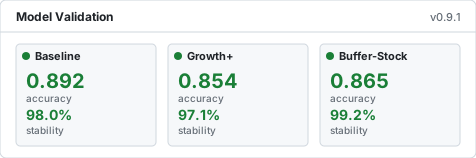
Three scenario validators check unemployment, inflation, and firm-size distributions against stylized facts. Robustness analysis and sensitivity sweeps are built in.
Calibration Pipeline
Morris screening, grid search, and tiered stability testing — all accessible from the same high-level API. Reproducible parameter estimation out of the box.

Quick Start#

pip install bamengine
import bamengine as bam

sim = bam.Simulation.init(n_firms=100, n_households=500, seed=42)
results = sim.run(n_periods=100, collect=True)

Browse all posts  ⟶

Try BAM Engine

Use the interactive shell to try BAM Engine in the browser

import bamengine as bam

sim = bam.Simulation.init(seed=42,
    logging={"default_level": "ERROR"})
results = sim.run(n_periods=100,
                  collect=True)

avg_price = results.economy_data["avg_price"]
inflation = results.economy_data["inflation"]

print(f'Final Average Market Price '
      f'at period {sim.t}: '
      f'{avg_price[-1]:.2}')
import matplotlib.pyplot as plt

fig, (ax1, ax2) = plt.subplots(1, 2,
                    figsize=(12, 4))
ax1.plot(inflation)
ax1.set_title('Inflation Rate')
ax1.set_xlabel('Period')
ax1.grid(True, alpha=0.3)

ax2.plot(avg_price)
ax2.set_title('Average Market Price')
ax2.set_xlabel('Period')
ax2.grid(True, alpha=0.3)

plt.tight_layout()
plt.show()